There is no PUBG Mobile Light APK yet, official or otherwise. The game launches on 12 November 2026, 08:00 UTC. Pre-register on Google Play or the App Store and the store installs it for you on launch day.
| Release date | 12 November 2026, 08:00 UTC |
|---|---|
| Price | Free |
| Download size, iOS | 2.50 GB as listed by Apple |
| Download size, Android | around 1 GB |
| Minimum iOS | iOS 13.0 |
| Supported iOS devices | 130, oldest is the iPhone 5s |
| Package name | com.tencent.igfit |
Read from the official App Store listing on 2026-09-21 12:52 UTC. Android size is the figure Krafton states publicly.
PUBG Mobile Light hasn’t launched, so there’s no file to download today. That’s the short answer. The rest of this page is the part most results for this search leave out: what actually exists right now, the one thing worth doing today, exactly how big the download will be, why it stays around 1 GB, and how to tell a fake APK apart from the real listing.
Is there a PUBG Mobile Light APK?
No. There’s no official PUBG Mobile Light APK, and there’s no unofficial file that is genuinely the game either. Krafton has published two listings and nothing else: the Google Play listing under the package ID com.tencent.igfit, and the App Store listing at apps.apple.com/us/app/pubg-mobile-light/id6740521489.
“There’s no APK” is where most pages stop, which is exactly why people keep searching. So here’s the full picture of what does exist right now.
- Pre-registration, open now. It opened on August 25, 2026 on both Google Play and the App Store. This is the real, useful thing you can do today.
- A closed regional beta. News coverage reports a closed beta rolling out in selected territories ahead of launch. It’s invite-only, it doesn’t appear on the public store listing, and it isn’t handed out as an APK. If you weren’t invited, there’s no link to find.
- Old files for a different game. Many of the APKs circulating under this name are builds of PUBG Mobile Lite, a separate and older game whose name is spelled differently. They aren’t this game.
- Repackaged installers. The rest are shells. A small file that loads ads, harvests permissions, or downloads something else entirely once you open it.
So the honest answer isn’t simply to wait. Pre-register, and the store delivers the real download to your phone by itself on launch day. It takes under a minute and it’s the only action that ends with the game actually installed.
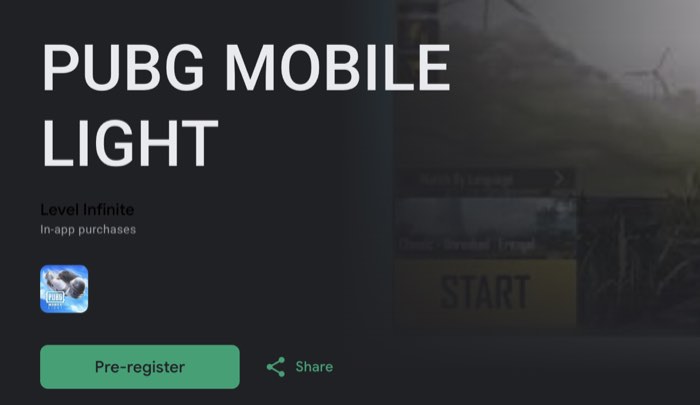
Where can you actually download PUBG Mobile Light?
One quick way to confirm you’re on the real listing: the Android publisher shows as Level Infinite, and the iOS listing is under the same publisher. BGMI Lite, which is the separate India game, shows KRAFTON, Inc. instead. If a listing shows any other publisher name, it isn’t the official app.
The Google Play Store on Android and the Apple App Store on iOS. There’s no third source, no publisher website download, and no direct link. That’s normal for a Krafton mobile title and it won’t change at launch.
The useful detail is this: the listing you pre-register on today is the same listing that serves the download at launch. Once you’ve pre-registered you never have to search for the game again, which also means you can never land on the wrong app by accident. That’s the practical reason to do it, before any question of rewards.
How to download PUBG Mobile Light on Android
- Open the Google Play Store.
- Search for PUBG Mobile Light.
- Open the listing and confirm the package ID is
com.tencent.igfit. Opening the same listing in a browser shows it as theid=value at the end of the address. It’s the single most reliable way to prove you’re on the right app. - Check the publisher matches the publisher of the official PUBG Mobile listing.
- Tap Pre-register. It’s live now. After launch the same button reads Install.
- If Play offers to install the app automatically on release, leave that enabled.
- At launch, let the roughly 1 GB download finish, open the game, and sign in with your existing PUBG Mobile account.
If the search returns nothing at all, the game is most likely not listed in your country. Check country availability before assuming something is broken, and read the India section further down, because India is a deliberate exception rather than an oversight.
How to download PUBG Mobile Light on iPhone
- Open the App Store.
- Search for PUBG Mobile Light.
- Confirm you’re on the official listing. Its address is
apps.apple.com/us/app/pubg-mobile-light/id6740521489, and the numeric ID at the end is the part a lookalike name can’t copy. - Check the seller line on the listing before you tap anything.
- Tap Get. Apple labels the button Get even before release, so confirming reserves the app rather than downloading it now.
- At launch the app downloads to your device on its own. Apple lists the iOS build at 2.5 GB, and app thinning trims what actually transfers.
- Open it and sign in with your existing PUBG Mobile account.
iOS has no sideloading equivalent to an APK for a game like this, so on iPhone the App Store listing isn’t merely the safest route, it’s the only one. Anything advertising an iOS install through a website, a profile, or a configuration file is a scam, and it’s usually built to take your Apple Account details rather than to give you a game.
Is PUBG Mobile Light free to download?
Yes. Pre-registration and pre-order cost nothing and there’s no purchase step before installing. Any site that asks you to pay or complete an offer for a download isn’t offering the real game.
Krafton hasn’t published details of what the game sells once you’re inside it, so treat any specific claim about prices, passes or bundles as unconfirmed until launch. For downloading, the rule is simple. Money never enters the process. If you’re being asked to subscribe, complete a survey, or verify you’re human before a file appears, you aren’t looking at the game.
What is the download size, and why is it only about 1 GB?
Around 1 GB on Android, and Apple lists 2.5 GB on iOS. That’s the whole install, not a stub that pulls the real game down afterwards.
The size is the entire point of the product. A normal PUBG Mobile install carries every map, every mode and every resource pack the game might eventually need. Light ships the part you use on day one and leaves the rest on the server. Erangel is included at launch. Miramar, Sanhok, Team Deathmatch and Metro Royale are downloaded on demand, when you choose to play them.
That matters most on exactly the phones this game is aimed at. A 1 GB install fits on a device where a full battle royale client doesn’t, and it fits over a mobile connection without hunting for Wi-Fi first. Krafton hasn’t published the size of the individual on-demand packs, so how much space the game occupies a month from now depends entirely on how many modes you add.
Krafton has also not published official system requirements for Light. Any page quoting an exact minimum RAM figure or Android version is guessing. We track that on the system requirements page and will update it when real numbers exist.
Do you need a second download after installing?
No. There’s no forced resource pack before your first match. You install roughly 1 GB, open the game, sign in and play.
This is the difference people notice first. Installing a full mobile battle royale usually means a store download followed by a second, larger in-game download before the menu will even let you queue. Light removes that step for the launch content.
You’ll still download things later, but only by choice. Pick Miramar, Sanhok, Team Deathmatch or Metro Royale and the game fetches that content at that point. Skip them and they never touch your storage.
Which maps are in the first download?
Erangel. It’s in the base install and playable the moment the game opens, which is precisely why there’s no mandatory second download.
Miramar, Sanhok, Team Deathmatch and Metro Royale sit behind on-demand downloads. That’s a storage decision, not a paywall. Nothing here costs money and nothing is locked behind progression. You simply choose what lands on your phone.
When can you download PUBG Mobile Light?
Pre-registration opened on August 25, 2026 and is open now on Google Play and the App Store. The download itself goes live at launch.
November 2026 is the launch window reported across coverage of the Krafton announcement. No exact day has been named, and Krafton hasn’t confirmed one. Anybody publishing a precise launch date is filling in a blank that hasn’t been filled in.
The App Store listing itself goes further than the coverage does: it shows an expected release date of November 12, 2026. Apple marks that as expected rather than confirmed, and Google Play shows no date at all, so treat it as the most specific figure available rather than a promise. Checked 31 August 2026.
More on timing and on what pre-registering gets you is on the pre-registration page and the release date page.
What will the download look like at launch?
Concretely, this is the sequence you should expect.
- The store button changes. Pre-register becomes Install on Google Play. On the App Store the button already reads Get, and it switches from reserving the app to downloading it.
- If you pre-registered with automatic install enabled, or pre-ordered on iOS, the download starts without you. You may simply find the icon waiting on your home screen.
- Roughly 1 GB transfers on Android. Apple lists 2.5 GB on iOS, though app thinning means your device pulls less.
- You open the game and sign in. There’s no separate registration and no new account to create.
- You’re in Erangel. No resource pack, no second wait.
Two things worth expecting on the day. Launch traffic makes downloads slower than the file size suggests, so a 1 GB install can still take a while. And store listings don’t always flip to live at the same minute in every country, so if a friend has it and you don’t, give it a few hours before assuming something has gone wrong.
Can you download PUBG Mobile Light in India?
No. PUBG Mobile Light isn’t releasing in India. India gets BGMI Lite instead, package ID com.krafton.bgmilite, with pre-registration open now and launch expected by the end of 2026.
Don’t apply the November window to BGMI Lite. They’re two separate releases on two separate schedules, and the dates aren’t interchangeable.
India is also where fake APKs do their best business, and the reason is structural. A player searches for a PUBG Mobile Light download, finds nothing on Play because there’s nothing to find, and takes the first file offered instead. Turn that around and it becomes a test you can use: if a site claims to have an India build of PUBG Mobile Light, that claim alone proves the file is fake, because the game isn’t being released in India at all.
The right page for Indian players is BGMI Lite, with timing on the BGMI Lite release date page. One more thing worth knowing: the old PUBG Mobile Lite listing returns a 404 in India while that game is still live in other countries. That 404 is why so many Indian searches end up on file-hosting sites in the first place.
Can you download the closed beta?
Not unless you were invited. News coverage reports a closed beta rolling out in selected territories ahead of launch. It isn’t announced on the store listing, the territory list hasn’t been published, and access is granted directly rather than through a public download.
This matters because the beta is the excuse nearly every fake file leans on. A leaked beta build sounds plausible in a way that a leaked unreleased game doesn’t. Closed beta access is normally tied to the account that was invited, so even a genuine build passed around the open web wouldn’t sign you in. And the files being passed around aren’t genuine builds.
How to spot a fake PUBG Mobile Light APK
Every fake trips at least one of these. Most trip several.
- The package name is wrong. The only Android package for this game is
com.tencent.igfit. Fakes use near-misses, extra words, or the package of a completely unrelated app. This is the hardest signal to fake and the easiest one for you to check. - The file size is wrong. The real install is about 1 GB. A 30 MB or 80 MB PUBG Mobile Light APK isn’t a compression miracle, it’s a downloader or an ad shell. A file in the hundreds of megabytes is usually old PUBG Mobile Lite wearing a new name.
- The publisher doesn’t match. Open the developer link on the listing and compare it against the publisher of the official PUBG Mobile listing. A brand new developer account with one app and a lookalike name is the oldest trick there is.
- It wants permissions the game doesn’t need. A battle royale has no use for SMS, call logs, contacts, notification access, accessibility services, or device administrator rights. Notification access and accessibility services matter most, because together they let an app read the one-time codes that protect your accounts.
- It isn’t on an official store. There’s no official APK. Not a delayed one, not a regional one, not an early one. Distribution outside those two store listings is unofficial by definition.
- It claims to work today. The game hasn’t launched. A working build right now is either the invite-only beta, which won’t sign you in, or it isn’t the game.
- Play Protect objects. If Android warns you during installation, that isn’t an obstacle to work around. That’s your answer.
- The download is gated. Surveys, human verification steps, link shorteners, a required app install first, a countdown timer. Legitimate software distribution doesn’t work like that.
One check outranks all of them: search the Play Store or the App Store yourself. If it isn’t there, it doesn’t exist yet.
What happens if you already installed a fake APK?
Deal with the phone first, then the accounts, in that order. Cleaning up an account while the malware is still running just hands over the new password too.
- Turn on airplane mode. It cuts the app off from wherever it has been sending things.
- Uninstall it. Settings, then Apps, find it, uninstall.
- If uninstall is greyed out, it has given itself device administrator rights. Go to Settings, Security, Device admin apps, revoke it there, then uninstall.
- If it still won’t go, restart into Safe Mode and uninstall from there. Safe Mode stops third-party apps from running, so it can’t defend itself.
- Check what it switched on. Look through Accessibility services, Notification access, and the list of apps allowed to install unknown apps. Revoke anything you didn’t enable yourself, not only the app you just removed.
- Run a Play Protect scan from the Play Store profile menu, and let it finish.
- Now change passwords, from a different device. Change the password on whichever account your PUBG Mobile login is linked to, then turn on two-factor authentication if it isn’t already on.
- Sign out everywhere. In your Google, Apple, Facebook or X account settings, review active sessions and devices and remove anything you don’t recognise.
If your PUBG Mobile account has already been taken, start recovery rather than making a new account, because a new one starts from zero. Our guide to linking and recovering a PUBG Mobile account walks through it.
If that phone also handles your banking, treat it as compromised until proven otherwise and do the clean-up from a computer instead of from the same device.
Why sideloading risks your PUBG Mobile account
This is the part that makes a fake APK expensive rather than merely annoying, and it follows directly from how Light is built.
Light isn’t a separate game with a separate account. Your existing PUBG Mobile account works in it, your items carry over, and it shares cross-play, ranks and matchmaking with the standard client. One account, two clients.
That unified account is also a unified risk. Three ways it goes wrong.
- Credential theft. Your game login sits behind a Google, Apple, Facebook or X account. An app with notification access can read the one-time code sent to that same phone, which is how takeovers actually happen. The malware never needs to beat the game, only the login behind it.
- Anti-cheat bans. A repacked client is a modified client by definition, and from the server side a modified client and a cheat client look alike. Bans land on the account, not on the file. Because the account is shared, a ban earned in a fake Light build takes your main PUBG Mobile progress with it.
- No route back. Appeals go to the publisher, and saying you installed it from somewhere else isn’t a defence that helps you.
Put plainly: the account you would be gambling on an unofficial file is the same account holding everything you’ve already earned in PUBG Mobile.
Do you need a new account to download and play?
No. Sign in with the PUBG Mobile account you already have. Your items carry over, and Light shares cross-play with the standard client on a single rank and a single matchmaking pool.
So downloading Light isn’t a fresh start and not a second game. It’s a smaller way into the same one. The two apps use different package IDs, so you can keep PUBG Mobile installed alongside it if you’ve the space, or replace it if you don’t.
Worth sorting out before launch: make sure your account is actually linked to something you can log back into. If it only exists as a guest session on an old phone, fix that now rather than on launch day. See linking and recovering your PUBG Mobile account.
Will the download get bigger over time?
Some growth is normal as updates add content, and Light won’t be an exception. The difference is that the extra content is modular. You choose what installs, instead of being handed a mandatory pack with every patch.
Krafton hasn’t published how large the on-demand packs are or how often updates will land, so the honest answer is that the base install is about 1 GB and everything past that depends on you. If storage is tight, stay on the launch content and leave the on-demand modes alone.
Can you download PUBG Mobile Light on PC?
There’s no PC version. It’s an Android and iOS app, and Krafton hasn’t announced a desktop client.
This gets confused with an older product constantly. PUBG Lite for PC was a different game and it shut down worldwide in 2021. That shutdown had nothing to do with PUBG Mobile Lite on phones, which is still live outside India, and nothing to do with PUBG Mobile Light, which hadn’t been announced at the time.
What should you do right now?
- Pre-register on Google Play or the App Store. It’s open, it’s free, and it’s the only step that ends with the real game on your phone.
- Leave automatic install enabled so launch day needs nothing from you.
- Clear a couple of gigabytes so the install and its first updates have room.
- Check your account link now rather than at launch, so signing in is one tap.
- Ignore every APK carrying this name until the store listing goes live. There’s nothing to miss out on, because there’s nothing there.
- In India, pre-register for BGMI Lite instead. That is the release you’re actually getting.
Before launch day, lock in your spot via pre-registration, and confirm availability in your country so you know which version you’re getting.
Looking for a PUBG Mobile Lite download instead?
A lot of people searching for a PUBG Mobile Lite download are actually after the new PUBG Mobile Light. The names are one letter apart, so here’s the difference in plain terms.
PUBG Mobile Lite is the older, separate game. It’s still live in a number of countries and can be downloaded from Google Play in those regions. India is the exception: the listing returns a 404 there, which is why Indian searches for it so often end on file-hosting sites. Old Lite APK files circulate widely, and none of them are the new game.
PUBG Mobile Light, spelled with a G, is the new app. It’s a lighter client for the real PUBG Mobile, around 1 GB on Android, and Apple lists 2.5 GB on iOS, sharing accounts and matchmaking with the standard game, and it arrives through the official stores only. If what you wanted was a small PUBG install for a budget phone, Light is the one to wait for. Full breakdown: PUBG Mobile Light vs PUBG Mobile Lite.
Frequently asked questions
Is there a PUBG Mobile Light APK to download now?
No. There’s no official APK and the game hasn’t launched, so any file offered under that name today is either an old build of a different game or malware. The only official listings are on Google Play and the App Store.
Where can I download PUBG Mobile Light?
Only from the Google Play Store and the Apple App Store. The Android package ID is com.tencent.igfit. There’s no official download outside those two listings.
How big is the PUBG Mobile Light download?
Around 1 GB on Android, and Apple lists 2.5 GB on iOS, with no mandatory extra package before your first match.
Do I need a second download after installing PUBG Mobile Light?
No. Erangel is included in the base install, so you can play straight away. Miramar, Sanhok, Team Deathmatch and Metro Royale download on demand, only if you choose to play them.
When can I download PUBG Mobile Light?
Pre-registration opened on August 25, 2026 and is open now. The full download goes live at launch, with November 2026 the window reported across coverage of the Krafton announcement. No exact day has been named.
Is PUBG Mobile Light free to download?
Yes. Pre-registration and pre-order cost nothing and there’s no purchase step before installing. Any site that asks you to pay or complete an offer for a download isn’t offering the real game.
Can I download PUBG Mobile Light in India?
No. PUBG Mobile Light isn’t releasing in India. Indian players get BGMI Lite instead, package ID com.krafton.bgmilite, with pre-registration open now and launch expected by the end of 2026.
Do I need a new account for PUBG Mobile Light?
No. Your existing PUBG Mobile account works, your items carry over, and Light shares cross-play, ranks and matchmaking with the standard client.
Can I play PUBG Mobile Light on PC?
It’s a mobile app for Android and iOS. Krafton hasn’t announced an official PC version.


Leave a Reply